Steps6
- Open Settings.
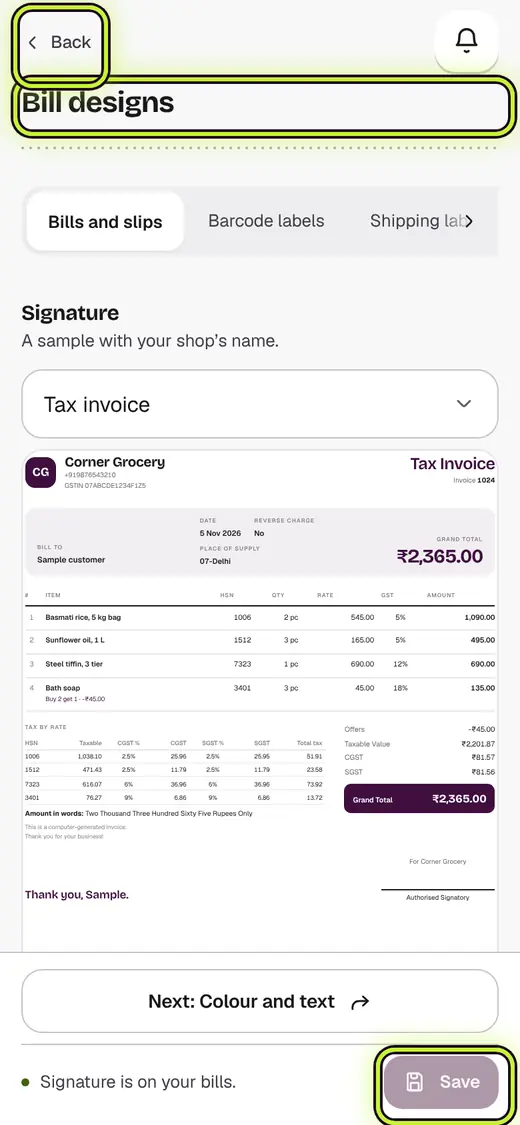
- Tap Bill designs.
- Pick a look. It is used on every paper and on the till slip.
- Tap Next at the bottom for the next step, or Back to go back. The line at the top shows your step. Tap any step to jump to it.
- Add your colour and logo, and choose what the bill shows.
- Tap Save.
If it stops you
A Pro look: you can try it on your own bill. Saving it needs the Pro or Business plan.
To keep your other changes, tap Save the rest on and your current look.
Labels have no colour step. A label printer prints in black only.
Still stuck?
In the app, tap ? on the screen you are on and ask in your own words. Or email support@kowntx.com. A person replies in writing. Never send your PIN, code or card number.